Three people bring sunscreen. Nobody brings the first aid kit.
Group trips get planned in a group chat, and the group chat forgets. Send one link instead — everyone adds what they’re bringing.
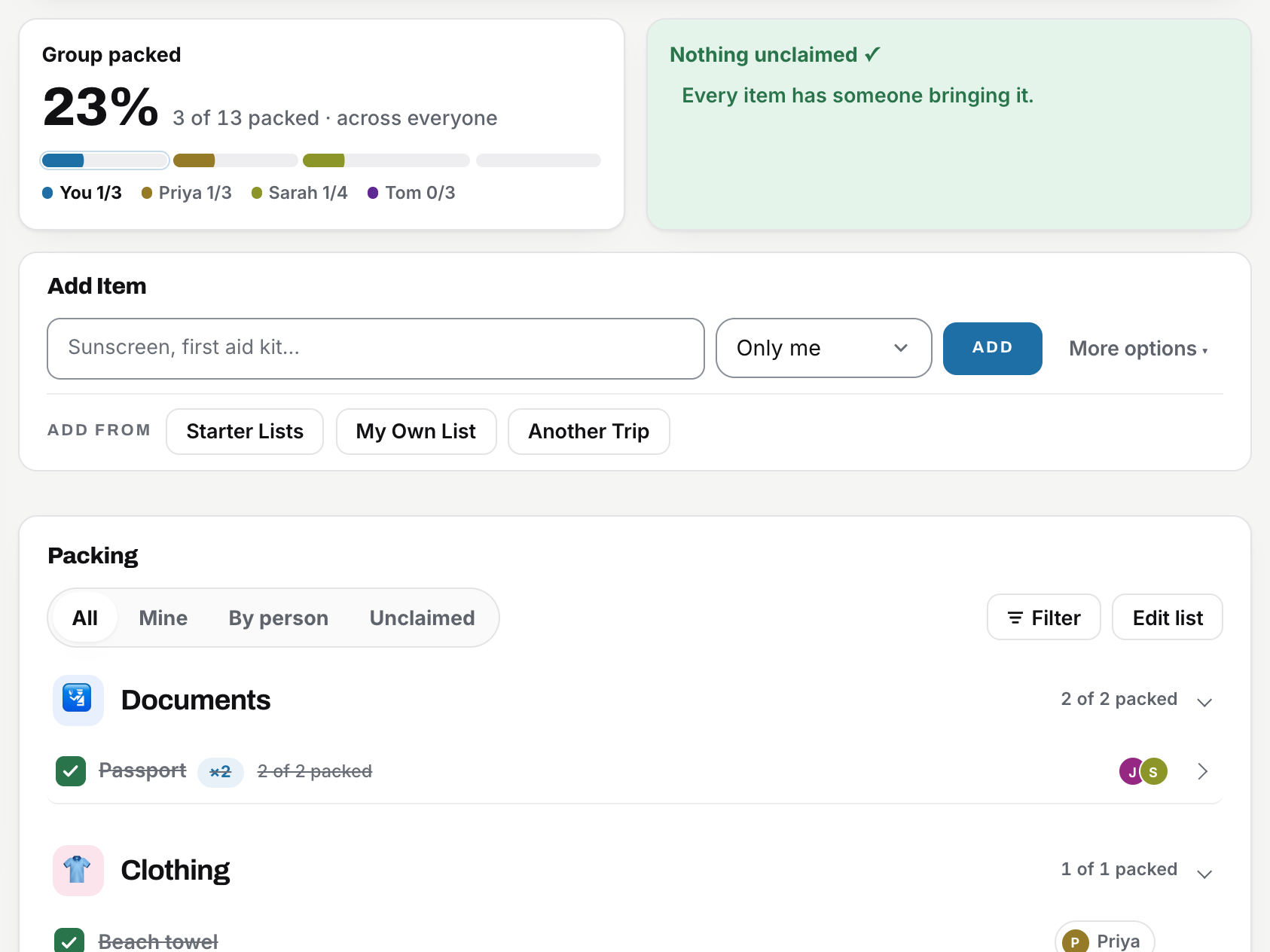
This is the example trip. Tap a box — it works, and nothing here is saved.
Any trip where more than one person packs.
Going away with friends?
Who has the speaker, esky, cards and BBQ gear?
Family holiday?
Pack for the kids too. Add them with no invite, and their list knows a baby from a teenager.
Camping?
Know who has the tent, stove, gas and first-aid kit.
Work trip?
Make sure the booth equipment actually makes it to the conference.
Three steps, no set-up.
-
Make the list
Paste the list from your notes app. It gets split into items, sorted into categories, and checked for doubles.
-
Send one link
They tap it, type a first name, and they’re on the list. Nothing to install, nothing to sign up for.
-
See the gaps
Unclaimed shows what nobody’s bringing yet. Doubles get flagged before three people pack sunscreen.
The parts a group chat can’t do.
- Weight and bag tracking — set your airline limit, watch the gauge fill
- Duplicate and gap detection — before three people pack sunscreen
- Per-person lists — everyone sees only what they’re carrying
- Works offline — the list is there at the departure gate
Plus weather for every stop, destination guides, visa & ETA checks, multi-city itineraries, print & PDF, starter lists, and group chat with @mentions.
Frequently asked questions
Short answers to the things people ask before their first trip.
0 trips packed
Do my friends need an account?
No. You send one link, they tap it, type their first name, and they’re on the list. No sign-up, no password, no app to install.
Is it free?
Yes, and it’s staying that way for everyone who joins a trip. If it saves you a headache, there’s a coffee button at the bottom of the page.
Does it work on my phone, and offline?
Yes. It runs in any phone browser. To have it ready for no signal, each person on the trip opens their invite link once while they still have signal and lets the page load fully. From then on their phone keeps its own copy: the list opens on the plane or at the campsite, ticks and additions save on the phone, and everything syncs to the group the next time it connects. Adding it to your home screen (next question) makes this the most reliable, because the browser then treats it as an app rather than a tab it can clear.
How do I put it on my phone’s home screen?
It gets its own icon and opens like an app, with no address bar. There’s nothing to download and no app store involved.
Where does the weather come from?
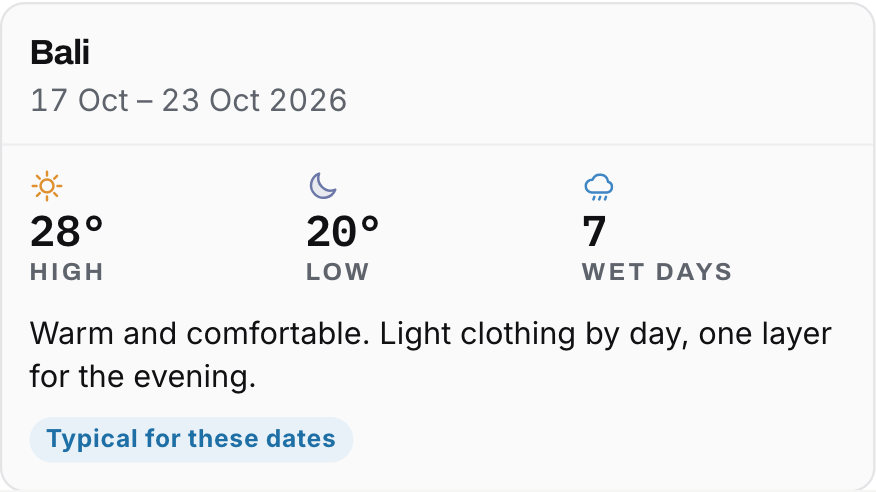
Real measured data for your exact dates and each city you’re visiting — a live forecast when the trip is close, and what actually happened on those dates last year when it’s further out.
Can I use it for a work trip?
That’s what it’s built for. Assign gear to each person, keep the shared kit in one place, check bags against the airline limit, and print the list for handover.
Still in the group chat?
Send them one link instead. Where and when is all it takes, and the list is ready before the chat moves on.
Master the app
Tips and tricks to get the most out of Who’s Bringing What.
Adding and assigning
Add in one line
Type an item and press Enter. The category is picked for you, and anything unusual lands in Other, never in the wrong place. Open Advanced options only when you need brand, amount, location, weight or a link.
Choose who brings it
Everyone gives each person their own copy (toothbrushes, chargers). Only me is yours. Assign to… hands it to someone. Unassigned leaves it for whoever claims it first.
Star the essentials
Tick Essential on anything the trip doesn’t work without. It shows a star in the list so passports and medication never hide among the socks.
Track what things cost
Add an optional cost to an item and the list keeps a running total per person and for the trip, in the trip’s currency. Handy for shared gear and splitting later.
Keeping the list tidy
Three ways to look at it
Everything shows the whole trip by category. Just Me is only your items. By Person gives each traveller their own card with a Sample list and To-do button.
Filter in one tap
Use the Whose chips to see one person’s items, the Shared ones or the Unclaimed. To pack and Packed split the list by what’s done. Location chips show what goes in which bag.
Tick as you pack
The green tick marks an item packed and dims it. Packing is separate from who brings it, so two people can share an item and each tick their own.
Edit list for the big jobs
Edit list lets you select several items, delete them together, or drag them into the order you pack. Cancel leaves everything as it was.
Getting the group in
One link gets everyone in
Copy Invite in the sidebar and send it to the group chat. Friends tap it, type their first name, and they’re on the list. No accounts, no app to install.
Claim the unclaimed
The Unclaimed card shows anything nobody’s bringing yet. Tap it to see them, then hit I’ll bring it to put your name on one.
Cover the group’s number
Set Group needs on an item like sunscreen or tents. Everyone’s copies add up against it, so the row reads “3 of 4 covered” until it’s sorted.
Talk it through
Group Chat sits in the sidebar. Type @ and a name to tag someone. Everyone on the trip can read it, so “who’s got the speaker?” gets answered once.
Before you go
Build the itinerary
Add each stop with its dates. The trip’s dates, the countdown and the weather all follow the itinerary, and each stop has a notes box for hotels and flight times.
Weather for every stop
The Weather panel shows highs, lows and wet days for each city on your dates, real data for the months you’re travelling. It tells you what to wear before you pack.
Read the Destination Guide
Open the guide under the trip title for visas, driving, phone plans, power plugs, tap water and dress codes, written for where you live.
Run the checklists
The To-do card has two ready-made lists: Before you go overseas (passport, insurance, bank, phone) and Before you leave the house (bins, plants, keys). Add your own too.
Saving and sharing
Watch your bag weight
Tap Your bag to set your airline allowance. Add weights to items and the bar shows how close you are, amber near the limit, red over it.
Share or print the list
The share icon on the trip photo has Copy list as text for the group chat, Print, Save as PDF, My list as PDF and a spreadsheet download.
Start from a template
Starter lists cover seasons, trip types and destinations. Pick one, untick what you don’t need, and add it to your list or to someone else’s.
Keep your trips
Trip creators sign in with Google so every trip they make is saved under My trips. Anyone joining never needs to sign in.